

When creating Text inside your Funnels and Websites you want to be as engaging as possible. One way to do so is by having visually appealing text.
The Block Editor allows you to play with different looks for part of the text instead of the entire Text Box, taking the customization to another level.
This results in a more dynamic and eye-catching text that will help you gain and maintain interest from your target audience, keep your website polished and organized and make navigating easy for you and your audience.
You can change the Font of the highlighted text by choosing from the drop-down menu.
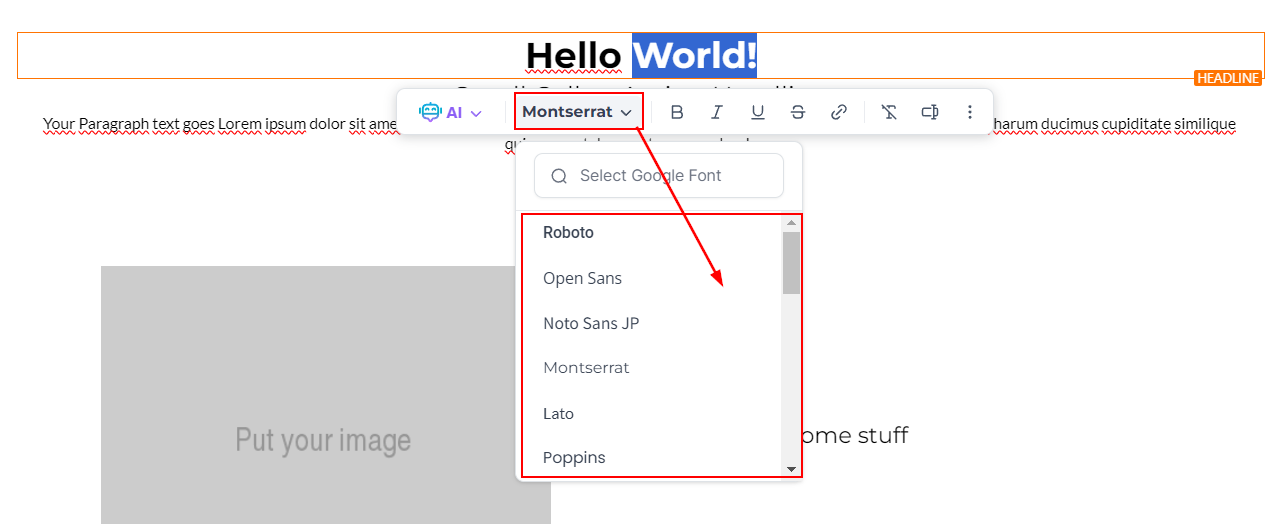
You can make your text Bold, Italic, Underline, or Strikethrough with your options below.

To add Subscript or Superscript text click on the three dots icon to open up the options.

You can also add links or custom values to the highlighted text.

Or if you don't like the changes you implemented remove the format so you can start with a fresh canvas.

That's all there is to it! Now you can make your text as interesting as you want. If you want to learn more about other parts of the Text Element or how to customize it please check the rest of the articles in this section.